
Back to Course

JSS3: COMPUTER STUDIES - 1ST TERM

0% Complete
0/0 Steps
  1. Computer Career Opportunities | Week 1
    5 Topics
    |
    1 Quiz
  2. Computer Viruses I | Week 2
    7 Topics
    |
    1 Quiz
  3. Computer Viruses II | Week 3
    7 Topics
    |
    1 Quiz
  4. Introduction To The Internet | Week 4
    4 Topics
    |
    1 Quiz
  5. Internet Terminologies | Week 5
    4 Topics
    |
    1 Quiz
  6. The Concept of Digital Divide | Week 6
    5 Topics
    |
    1 Quiz
  7. Database Concept, Definition And Terminologies | Week 7
    4 Topics
    |
    1 Quiz
  8. Database II | Week 8
    3 Topics
    |
    1 Quiz
  9. Database III | Week 9
    13 Topics
    |
    1 Quiz
  • excellence
  • Follow

Lesson Progress
0% Complete

Topic Content:

  • Client-Server – Request Architecture
  • Protocols
  • Packets
  • Routers
  • Port Numbers and IP Addresses
  • How are Packets Routed
  • How Google Search Works
  • How Sending and Receiving Emails (e.g. Gmail) Work

Client-Server – Request Architecture:

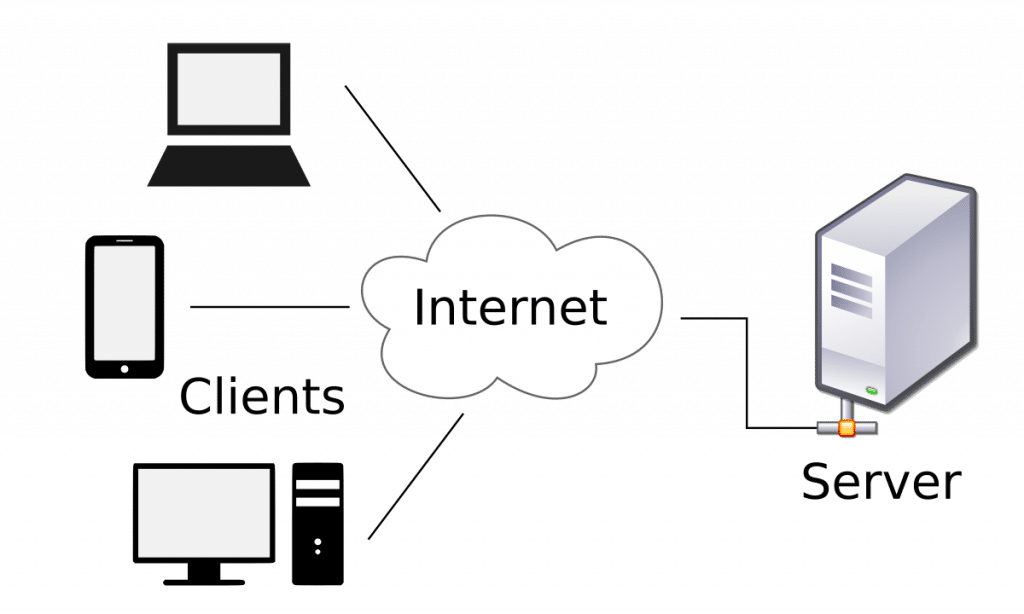
Data and information are transferred over the internet through servers and clients (which are computers) connected to the internet.

client-server
Client-server – request architecture

A server is a computer that supplies services or data to other machines on a LAN or WAN. Computers that request services from a server are known as clients. In other words, servers store and transmit data, while clients request this data from the server.

Protocols:

Data is transferred between clients and servers using protocols like TCP/IP and HTTP/HTTPS. In networking, a protocol is a standardized way of doing certain actions and formatting data so that two or more devices that may use different hardware and run different software (e.g. Windows and Mac) are able to communicate with and understand each other. There are protocols for sending packets between devices on the same network (Ethernet), for sending packets from network to network (IP), for ensuring those packets successfully arrive in order (TCP), and for formatting data for websites and applications (HTTP/HTTPS).

Packets:

When a user wants to access a website, their computer (the client) sends a request to the server, which then sends back the requested data in the form of packets. This data can include HTML, CSS, JavaScript, images, and other resources needed to display the webpage. 

The data is first broken up into smaller packets, which are then translated into bits. These broken-down packets then travel through devices like routers and switches, utilizing technologies like Ethernet cables and wireless signals (Wi-Fi), to facilitate the transfer of information across networks.

Router:

A router is a computer switching program that transfers data through the most efficient route possible until it reaches the correct destination. Routers are like the traffic cops of the Internet, ensuring that Internet traffic is directed to the correct networks. Millions of routers are interconnected to form the backbone of the Internet, ensuring the smooth flow of information across the world.

router
Router

Port Numbers and IP Addresses:

Port numbers are 16-bit integers (from 0 to 65535), assigned to individual connections or services running on a device.

Port numbers are crucial for directing data to the correct application on a destination computer because they identify the specific service or application that should receive incoming data. Examples of port numbers and their applications include:

  • iTunes Music Sharing/AirPlay – port 3689
  • FTP – Ports 20 & 21
  • iMessage – port 5223
  • Port 80 is the standard port for HTTP (insecure web traffic), while port 443 is used for HTTPS (secure web traffic).

An IP address identifies a machine in an IP network (like your personal computer) and is used to determine the destination of a data packet.

The router uses the combination of the IP address and port number to uniquely identify the destination and ensure the data is delivered to the correct application.

How are Packets Routed?

Each device connected to the internet has a unique IP address, which helps in identifying and routing data packets.  Routers use these IP addresses, along with routing tables and protocols, to determine the best path for a packet to reach its destination.

The information about the packet’s contents is known as the “header“. The header provides instructions and information that routers use to process the packet correctly. This includes identifying the packet’s origin and destination, as well as other details needed for efficient delivery. The destination IP address and port number in the packet header tell the router where the data needs to go. IP address identifies a specific device or network interface, while a port number identifies a specific application or service running on that device

Routers read the packet’s header, then consult their routing table for the most efficient path and forward the packet to the next network in that path, and this process repeats at each subsequent router until the packet reaches its final destination. 

When the packets arrive at their destination, the receiving device/application reassembles the packets in order and can then use or display the data.

How Google Search Works:

When you search on Google, your request travels through the internet using your IP address and a port. Port 80 is used to send and receive page requests from Google servers and other web servers.

  • Your browser first needs to find the IP address of Google’s servers by translating the human-readable domain name, google.com, into an IP address using the Domain Name System (DNS) server.
  • Once Google’s IP address is known, your browser establishes a TCP/IP connection with Google’s servers. This TCP/IP allows for reliable communication between the browser and the server. 
  • Your browser then sends the search query as an HTTP request over the established TCP/IP connection.
  • This request travels through your network, including your router and your ISP’s network, to reach Google’s servers.
  • Google’s servers receive the request, process it, and then send back the search results.
  • These results are transmitted back to your browser, again using TCP/IP and your IP address.

How Sending and Receiving Emails (e.g. Gmail) Works:

Sending Mails:

Sending and receiving emails involve a series of steps. When you send an email, your email client (Gmail or Yahoo Mail) interacts with the Simple Mail Transfer Protocol (SMTP) server using a TCP connection and a specific port. For sending a Google Mail, the client typically uses port 587.

  • The TCP protocol breaks down the email into smaller packets, each containing the sender and recipient addresses, along with the email content.
  • Each packet includes the IP address of the destination (Gmail’s SMTP server).
  • Once the packets arrive at Gmail’s SMTP server, the server reassembles the email and forwards this reassembled email to the recipient’s email server, which is responsible for delivering it to the recipient’s inbox.

Receiving Mails:

When Gmail sends you an email, it uses IP addresses and ports to communicate with your email server. Your email server settings can be found in your account settings.

  • First, Gmail’s server establishes a TCP connection with your email server using a specific port, usually port 993 or 995. When sending an email from Gmail to a Hotmail account, it travels across different servers managed by each company. 
  • The IP addresses in the packets are used to route the emails to your email server.
  • Your email client (Gmail, Hotmail or Yahoo Mail) connects to your email server using TCP, retrieves the new emails, and displays them in your inbox.

SMTP (Simple Mail Transfer Protocol) is the protocol used to send emails from your client to the server.

Subscribe
Notify of
guest
0 Comments
Oldest
Newest
Inline Feedbacks
View all comments
0
Would love your thoughts, please comment.x
()
x